
How to Register on Lucky Sabong: Complete Step-by-Step Guide
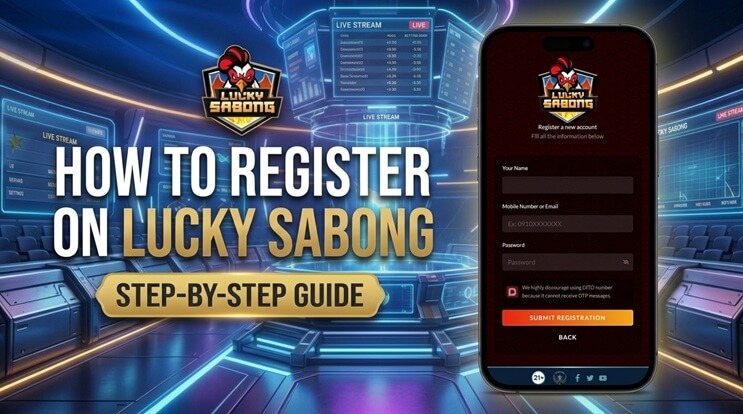
Online cockfighting — widely known across the Philippines as e-sabong has evolved dramatically over the years, bringing the thrill of traditional arena matches directly to smartphones and desktop screens. Among the names frequently searched by enthusiasts, Lucky Sabong stands out as a popular platform known for its streamlined interface and quick matchmaking.
If you are looking to create an account, understanding the exact sign-up flow, security requirements, and payment setup will save you time and protect your personal data. This comprehensive, step-by-step guide walks you through everything you need to know to register safely and efficiently.
Pre-Registration Checklist: What You Need Before You Start
Before visiting the registration page, gather a few essential items so you can complete the sign-up process without interruptions or session timeouts:
- An Active Philippine Mobile Number: Your phone number acts as your primary security anchor. You will need it to receive your One-Time Password (OTP) during sign-up and for future password resets.
- A Verified E-Wallet or Online Bank Account: Most players rely on local digital wallets like GCash or Maya for fast, low-friction transfers. Make sure your e-wallet is fully verified so you don't run into transaction limits later.
- A Reliable Internet Connection: Unstable mobile data can cause verification forms to freeze or fail to send OTP codes. Switch to a steady Wi-Fi connection or a strong 4G/5G signal before starting.
- Valid Government-Issued ID (Just in Case): While initial registration rarely requires document uploads, platforms often request Know Your Customer (KYC) verification before approving large withdrawals. Having a valid ID (such as a PhilSys ID, Driver’s License, or Passport) ready ensures smooth payouts down the road.
Step-by-Step Guide
Creating an account takes less than five minutes when you follow the proper sequence.
Step 1: Navigate to the Official Lucky Sabong Website
Open your mobile or desktop browser (such as Google Chrome or Safari) and head directly to the official Lucky Sabong Registration page or main portal.
- Pro Tip: Double-check the spelling of the domain in your browser's address bar. Phishing sites often use lookalike URLs to steal login credentials.
Step 2: Click the Registration Button
Once the homepage finishes loading, look for the call-to-action button labeled Register, Sign Up, or Play Now. On desktop browsers, this is typically located in the top-right header; on mobile screens, it is usually centered prominently on the main banner. Tap it to launch the account creation form.
Step 3: Enter Your Personal Account Details
Carefully fill in every required field on the Lucky Sabong sign-up form. Accuracy matters here, mismatched details can cause headaches during withdrawals later.
- Username: Create a unique alphanumeric username (e.g., JohnyGF70). Avoid using your full legal name for privacy.
- Password: Build a strong password with at least 8–12 characters, mixing uppercase letters, lowercase letters, numbers, and symbols.
- Confirm Password: Re-type your password exactly to ensure there are no typos.
- Mobile Number: Input your active 11-digit Philippine mobile number (starting with 09).
- Referral / Agent Code (Optional): If a registered agent or friend invited you to join, enter their referral code in the designated box to link your account under their network.
Step 4: Complete SMS OTP Verification
Review your entries one last time, agree to the platform’s Terms and Conditions, and click Send OTP or Submit. Within seconds, an automated SMS containing a 4-to-6-digit One-Time Password will arrive on your phone. Type this code into the verification field on your screen and click Confirm to activate your Lucky Sabong account.
Step 5: Log In and Set Up Your Wallet
After your account is verified, you will be redirected to the login page (or logged in automatically). Enter your newly created username and password to access the member dashboard. From there:
- Open the Profile, Cashier, or Wallet tab.
- Bind your preferred payout method (such as your verified GCash or Maya account).
- Ensure the account name on your e-wallet matches the name registered on your profile to prevent declined transactions.
Troubleshooting Common Lucky Sabong Registration Issues
Even simple sign-up forms can occasionally hit a snag. Here is how to fix the most frequent registration errors:
- Not Receiving the OTP Code: Toggle Airplane Mode on and off to refresh your cellular network, confirm your SMS inbox isn't full, and verify you didn't accidentally include a space before or after your phone number. Wait at least 60 seconds before hitting "Resend Code."
- "Username Already Taken" Error: Popular handles go fast. Try adding numbers or underscores to make your Lucky Sabong username unique.
- "Mobile Number Already Registered" Alert: Each phone number can only be linked to one account. If you previously created an account, use the Forgot Password link on the login page instead of registering again.
- Page Not Loading or Blank Screen: Clear your browser cache, disable aggressive ad-blockers temporarily, or switch from an in-app browser (like Facebook or Messenger's built-in browser) to Chrome or Safari.